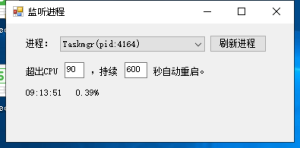
贴一段代码,用途是每秒监听选择的进程,若该进程连续x秒超出CPU占用x百分比时,则自动杀掉该进程并自动重新启动。
有一个遗憾就是获取进程占用是通过进程名查找的不是通过pid,所以如果同一个名称有多个可能会出现统计不准确问题。
using System;
using System.Collections.Generic;
using System.ComponentModel;
using System.Data;
using System.Diagnostics;
using System.Drawing;
using System.Linq;
using System.Text;
using System.Windows.Forms;

namespace ListenTask
{
    public partial class Form1 : Form
    {
        PerformanceCounter p1;
        int p1OverTimes = 0;        //进程连续超出多少次了
        int setUsage = 90;          //CPU使用上限
        int setTimes = 600;         //连续多少秒
        public Form1()
        {
            InitializeComponent();
            button1_Click(null, null);
        }

        private void comboBox1_SelectedIndexChanged(object sender, EventArgs e)
        {
            var proObj = Process.GetProcessesByName(
                this.comboBox1.SelectedItem.ToString().Substring(0, this.comboBox1.SelectedItem.ToString().IndexOf("("))
                ).FirstOrDefault();
            p1 = new PerformanceCounter("Process", "% Processor Time", proObj.ProcessName);
            p1OverTimes = 0;
            this.timer1.Enabled = true;
            this.timer1.Start();
        }


        private void timer1_Tick(object sender, EventArgs e)
        {
            try
            {
                if (p1 != null)
                {
                    float cpuUsage = p1.NextValue() / Environment.ProcessorCount;
                    this.label2.Text = DateTime.Now.ToString("HH:mm:ss") + "   " + Math.Round(cpuUsage, 2) + "%";
                    if (p1OverTimes != 0)
                    {
                        this.label2.Text += "(已连续超出" + setUsage + "%:" + p1OverTimes + "秒)";
                    }
                    if (cpuUsage >= setUsage)
                    {
                        p1OverTimes = p1OverTimes + 1;
                        if (p1OverTimes >= setTimes)
                        {
                            var proObj = Process.GetProcessesByName(
                                        this.comboBox1.SelectedItem.ToString().Substring(0, this.comboBox1.SelectedItem.ToString().IndexOf("("))
                                        ).FirstOrDefault();
                            proObj.Kill();
                            Process.Start(proObj.MainModule.FileName);
                            p1 = new PerformanceCounter("Process", "% Processor Time", proObj.ProcessName);
                        }
                    }
                    else
                    {
                        p1OverTimes = 0;
                    }
                }
            }
            catch(Exception ex)
            {
                p1 = null;
                this.timer1.Stop();
                this.label2.Text = "---";
            }
        }

        private void button1_Click(object sender, EventArgs e)
        {
            this.comboBox1.Items.Clear();
            Process[] proArr = Process.GetProcesses().OrderBy(x => x.ProcessName).ToArray();
            foreach (var item in proArr)
            {
                this.comboBox1.Items.Add(item.ProcessName + "(pid:" + item.Id + ")");
            }
        }

        private void textBox2_TextChanged(object sender, EventArgs e)
        {
            if (!int.TryParse(this.textBox2.Text, out setTimes))
            {
                this.textBox2.Text = "600";
            }
        }

        private void textBox1_TextChanged(object sender, EventArgs e)
        {
            if (!int.TryParse(this.textBox1.Text, out setUsage))
            {
                this.textBox1.Text = "90";
            }
        }
    }
}