就在值的末尾增加“\t”即可。例如:“13800010001\t”
ToDo:附JS根据tableid导出table元素
就在值的末尾增加“\t”即可。例如:“13800010001\t”
ToDo:附JS根据tableid导出table元素
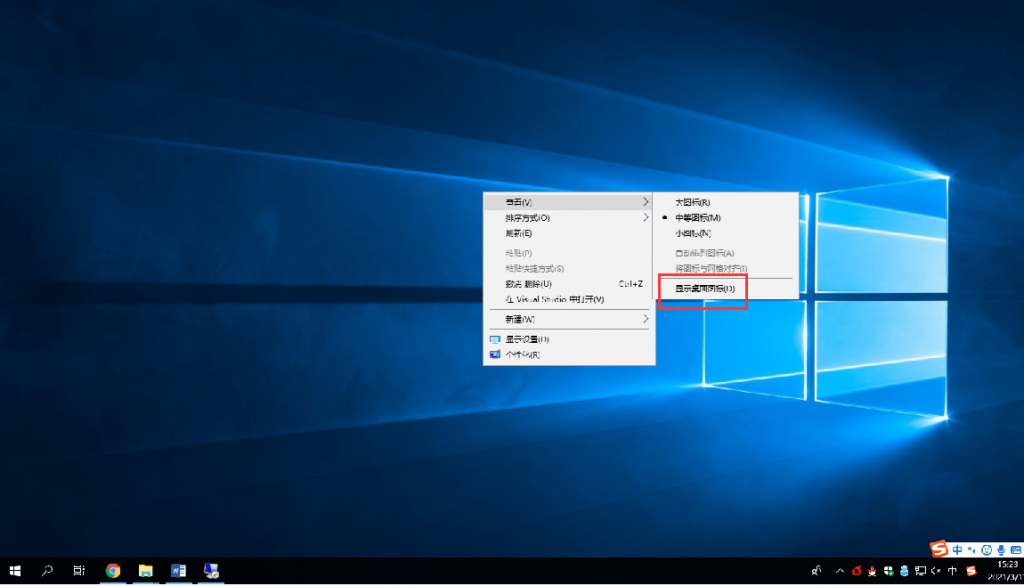
如下图,在桌面右键–查看–显示桌面图标,这个选项是不是之前无意间按过?
https://www.cnblogs.com/hanwenhua/articles/3853352.html
    // yyyy-MM-dd HH:mm:ss
    function getNowFormatDate() {
        var date = new Date();
        var seperator1 = "-";
        var seperator2 = ":";
        var month = date.getMonth() + 1;
        var strDate = date.getDate();
        if (month >= 1 && month <= 9) { month = "0" + month; } if (strDate >= 0 && strDate <= 9) {
            strDate = "0" + strDate;
        }
        var currentdate = date.getFullYear() + seperator1 + month + seperator1 + strDate
            + " " + date.getHours() + seperator2 + date.getMinutes()
            + seperator2 + date.getSeconds();
        return currentdate;
    }
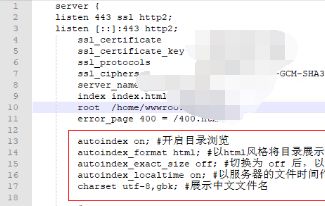
1、安装nginx后,在/etc/nginx/conf/conf.d目录寻找.conf文件,编辑它。
vim /etc/nginx/conf/conf.d/a.conf
2、在该文件下的server处,或者某个location以下,粘贴如下代码。
autoindex on; #开启目录浏览
autoindex_format html; #以html风格将目录展示在浏览器中
autoindex_exact_size off; #切换为 off 后,以可读的方式显示文件大小,单位为 KB、MB 或者 GB
autoindex_localtime on; #显示服务器的的时间
charset utf-8,gbk; #中文文件名
3、重新启动nginx
service nginx restart
https://segmentfault.com/q/1010000009447680
将文本框一系列控件的字体大小设置成16px即可。尝试过别的方式meta或者js监听都不是很好。
input[type="color"],
input[type="date"],
input[type="datetime"],
input[type="datetime-local"],
input[type="email"],
input[type="month"],
input[type="number"],
input[type="password"],
input[type="search"],
input[type="tel"],
input[type="text"],
input[type="time"],
input[type="url"],
input[type="week"],
select,
textarea {
  font-size: 16px;
}